How to Reverse Engineer an APK: a 2026 Walkthrough
Reverse engineering an Android APK means taking the shipped .apk file apart and understanding what the app actually does: its classes, its code paths, the secrets baked into it, and the network it talks to. This guide walks the whole thing end to end in Rutken, with screenshots of every screen and exactly what to click. No root, no emulator required for the static pass, and you can follow along on the free tier.
What "reverse engineering an APK" actually means
An APK is a ZIP archive, and the interesting part is inside it: one or more classes.dex files of compiled Dalvik bytecode, a binary (not text) AndroidManifest.xml, a compiled resources.arsc, and native .so libraries under lib/. To reverse engineer it you take that bytecode back from "a blob the VM executes" to "classes and methods you can read," then map how those methods call each other, then look for the things that matter: hardcoded API keys, weak cryptography, insecure network calls, and the places where untrusted input reaches a dangerous sink. The traditional way to do this is to run apktool to unpack, jadx to decompile, then read it all by hand or glue scripts around it. That works, and it also leaves you holding a decompiled source tree with no model of data flow, no reachability, and no ranking. Rutken does the decompile, the call graph, the data-flow analysis, and the findings as one pass over one model.
The pipeline underneath: parser, IR, analysis, rules
It helps to know the shape of what is happening, because it is what makes the findings trustworthy rather than a pile of regex hits. Rutken is built like a small compiler, in layers, and each layer only knows about the one below it.
The parser reads the DEX format directly. DEX is a dense, pointer-heavy container: variable-length ULEB128 and SLEB128 integers, a string pool, and parallel id tables (string_ids, type_ids, proto_ids, the method and field ids) that the class definitions index into. A method's actual bytecode lives at a code_off offset reached through its class_def. Getting this wrong is how a decoder silently desynchronizes and hands you garbage three classes later, so the parser is where the format details stop. Nothing above it is allowed to know what a code_off is.
Above the parser sits the IR, an intermediate representation of each method that is readable and uniform, with real register and parameter metadata, so the analysis does not re-derive Dalvik quirks every time it wants to ask a question. On top of the IR, the analysis layer builds the call graph, runs data-flow, and computes taint, consuming only the IR, never re-parsing the APK. Finally the rules read the analysis output and emit findings. A rule returns a finding; it never modifies code. The payoff of that discipline is that every finding you see is a conclusion the layers below can account for, with a method and a line attached, which is exactly what grep-over-decompiled-source cannot give you.
Step 1: Open the APK and read the static analysis
Drag an APK onto Rutken, or use File → Open target and pick the .apk. Rutken parses the DEX, builds the intermediate representation, and runs the rule set automatically. Click STATIC on the left rail to land on the main analysis screen.
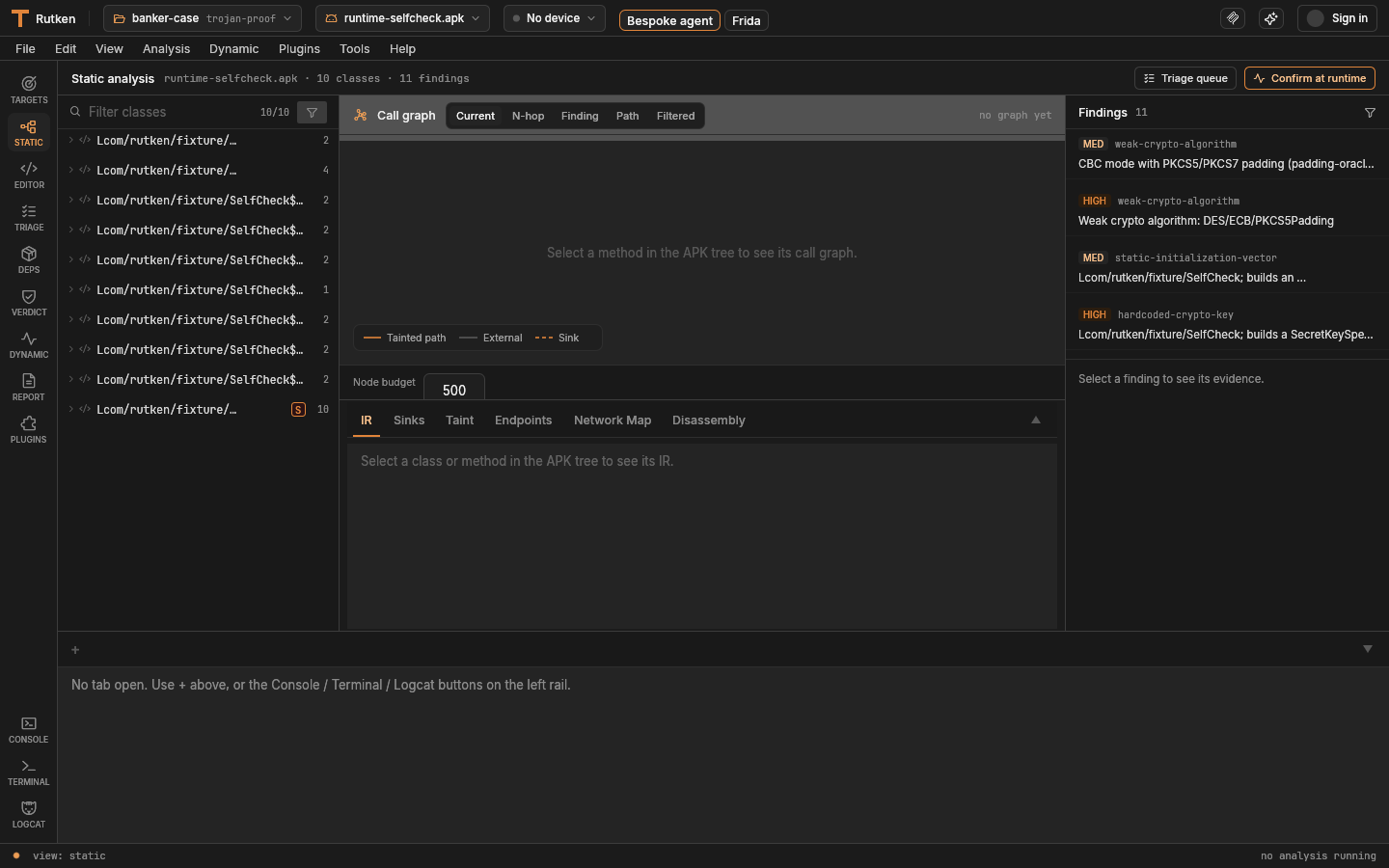
The left column is the class tree, every class Rutken recovered from the DEX. The center is the call graph: click any method in the tree and Rutken draws who calls it and what it calls, with tainted paths and network sinks highlighted. The right column is the findings list, ranked by severity. Click a finding to jump straight to the exact method and line that triggered it.
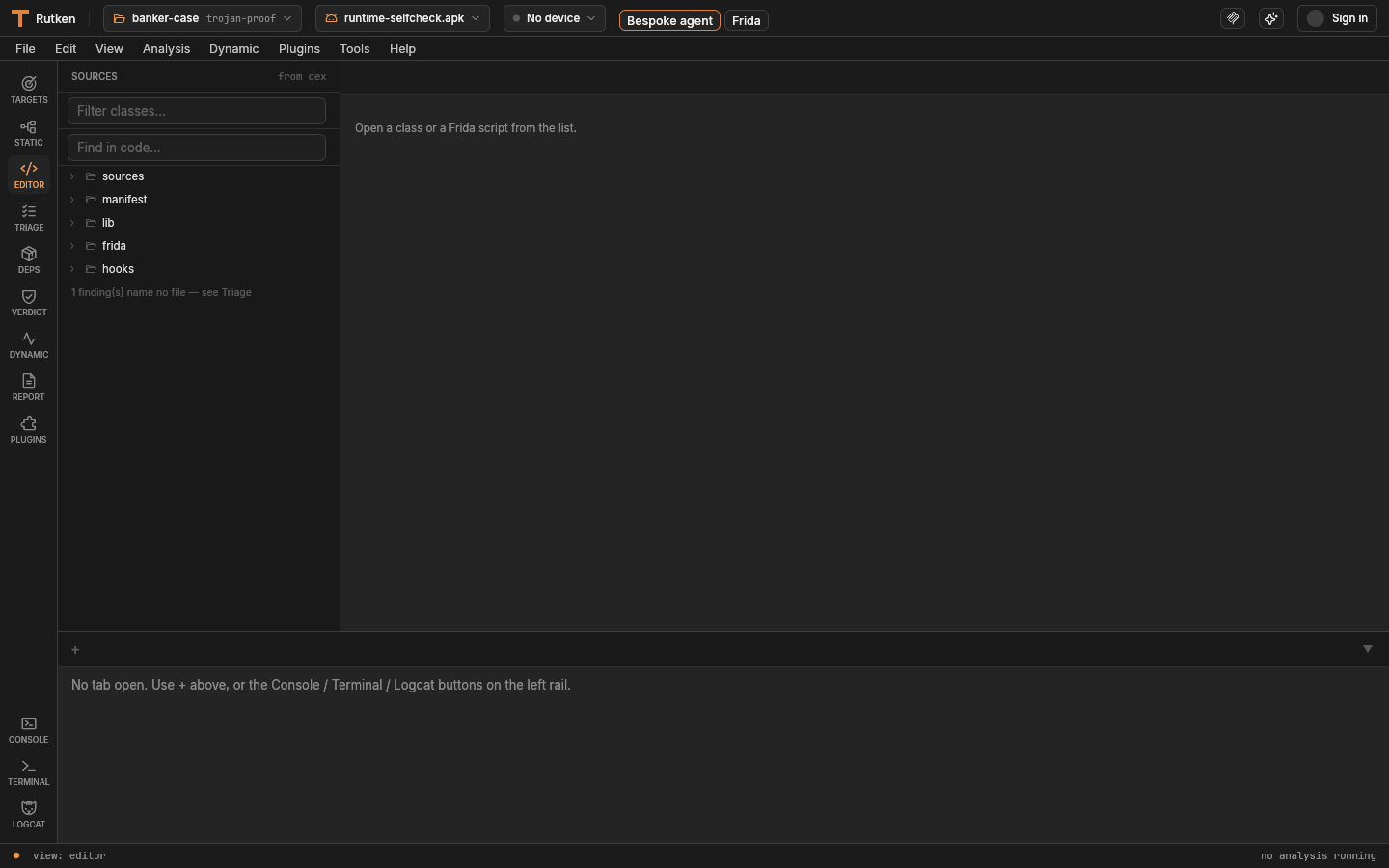
Before you dive into code, the manifest is worth a minute. The binary AndroidManifest.xml is where an app declares what it can do and what it exposes: its permissions (a surveillance app's over-broad grants show here first), its exported activities, services, and receivers (every exported component is attack surface another app can reach), its intent filters, and flags like android:debuggable and the network security config that decide whether the app is cleartext-friendly or trivially instrumentable. A reverse engineer reads the manifest to decide where to look; the class tree and findings tell you what is there once you do.
Step 2: Read the bytecode and the call graph
Select a class in the tree, then use the tabs under the call graph, IR, Sinks, Taint, Endpoints, Network Map, Disassembly, to read the method at whatever altitude you need. The IR tab shows Rutken's readable intermediate representation; Disassembly shows the raw Dalvik when you want to see the exact instruction. The call graph itself is not a naive "who mentions whom." Virtual and interface calls in Dalvik do not name a single target, so the graph is built with class-hierarchy analysis: it resolves a virtual dispatch to the set of concrete implementations the hierarchy allows, bounded so a wildly polymorphic interface does not explode the graph. That is the difference between a call edge you can trust and one that is a guess.
The N-hop and Path controls are how you turn that graph into an answer. N-hop expands reachability outward from the selected method so you can see everything it can eventually reach within a chosen number of calls; Path traces a single route from a source to a sink. Together they answer the question reverse engineering actually asks, "can attacker-controlled input reach this dangerous call," without you reading every method by hand. On a large app this is the difference between an afternoon and a week.
Data flow: how a value gets from a source to a sink
Reachability tells you a call can happen; data flow tells you what value arrives when it does. Rutken runs a data-flow framework over the IR that can solve forward (where does this value go) and backward (where did this argument come from). Two capabilities of it carry most of the weight for reverse engineering.
The first is constant propagation and string folding. A lot of the interesting evidence in an app is a constant that has been split up, a key assembled from pieces, a URL built by concatenation, a cipher transform passed as a string. Folding those back to their concrete value is what lets a finding say "this SecretKeySpec is built from the literal bytes ..." instead of "there is a SecretKeySpec somewhere." The second is taint: label a value at a source (user input, an intent extra, a cursor read) and track whether it flows, through assignments, method calls, and returns, into a sink (a network send, a command, a SQL string). A taint result with a complete path is a proven flow; a result with a gap is reported as exactly that, a possible flow, not dressed up as a certainty.
Step 3: Find the secrets and the weak crypto
The findings list is where reverse engineering turns into results. These are not string matches; each one is a rule reading the analysis output and emitting a conclusion with a citation. Here is what the common crypto and secret findings actually key on:
| Finding | What it keys on | Evidence |
|---|---|---|
weak-crypto-algorithm | a Cipher.getInstance whose folded transform names a broken primitive or mode (DES, ECB, a CBC padding-oracle shape) | class, method, the transform string |
hardcoded-crypto-key | a SecretKeySpec whose key bytes fold to a constant rather than arriving from key derivation or the keystore | class, method, the constant key material |
static-initialization-vector | an IvParameterSpec built from a constant IV, reused across encryptions | class, method, the IV bytes |
insecure-random-for-crypto | a non-cryptographic RNG feeding key or IV material (not SecureRandom) | class, method, the source |
android-hardcoded-secret | an API key or token shaped constant in the binary | class, method, the string |
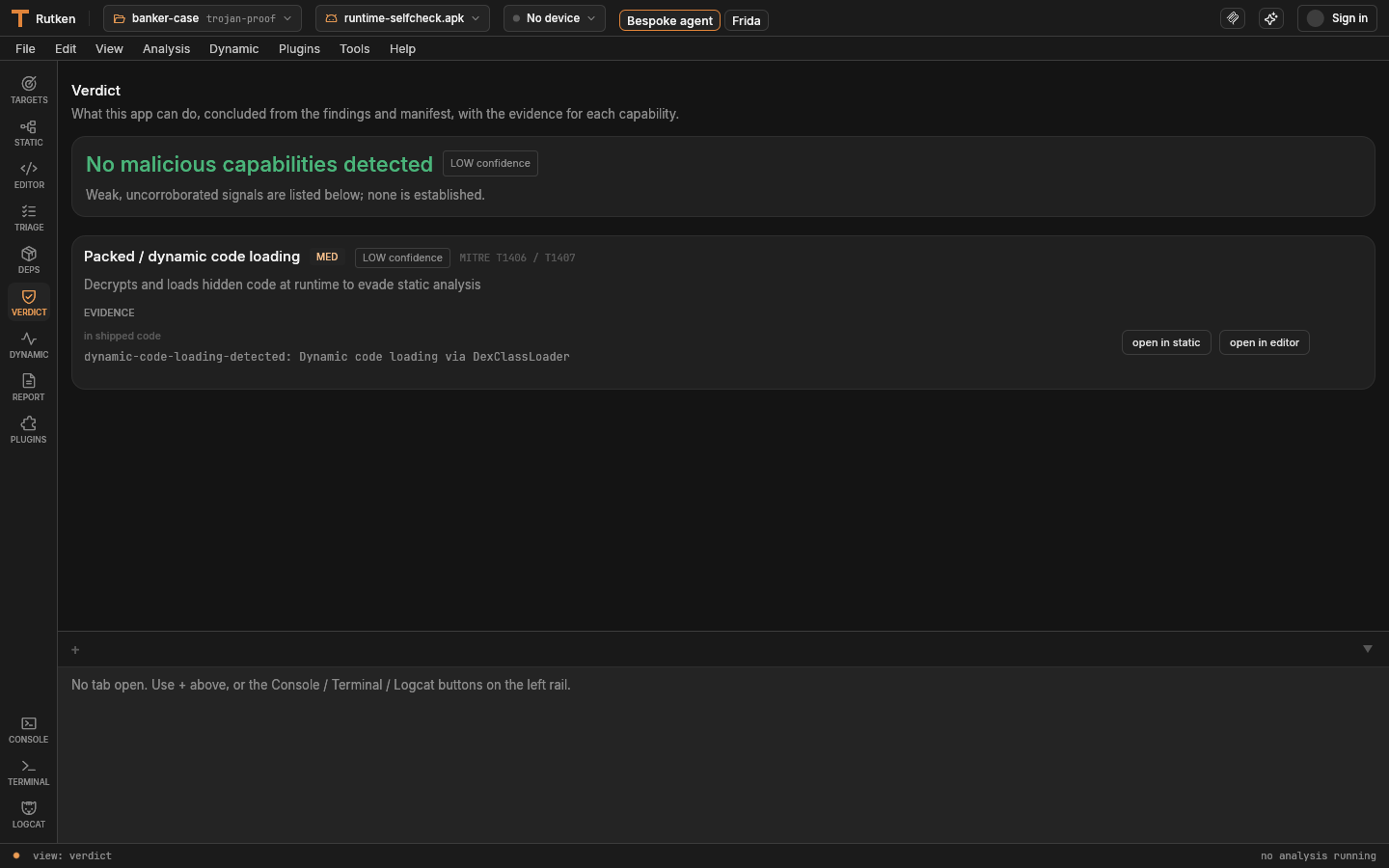
This is also where precision earns its keep. A naive crypto rule flags every DES it sees, including the JCE placeholder strings and the SecureRandom subclass that extends Random, and buries you in false positives. Folding the real transform and checking the real source is what keeps the list short enough to act on. Each finding names the class, the method, and the evidence, so you are reading a conclusion with a citation, not grepping strings and guessing. Click VERDICT on the left rail for the ranked, deduplicated summary of everything the app is doing.
The obfuscation problem, and structural matching
Real apps ship through R8, which renames classes and methods to short meaningless identifiers, inlines what it can, and strips what it does not need. That breaks any analysis that depends on names. okhttp3.Request$Builder.url becomes a.b.c, and a rule that looks for the networking call by name finds nothing, silently, which is the worst failure mode because it reads as "clean." Rutken's analysis works on the renamed code because it does not lean on names where it does not have to. Method descriptors (the parameter and return types) survive R8, and so does the structural relationship between a library's own classes.
So for the cases that matter, recognizing a networking sink, a certificate pinner, or a known library version, Rutken uses structural matching: it identifies a class and method by the shape of its descriptors and its call relationships rather than its stripped name. A renamed Request$Builder.url(String) still has the descriptor shape of a builder's url setter, and a shrunk okhttp3 still has the structural fingerprint of okhttp3, even as a.b.c. This is the same mechanism that lets the dependency scanner identify a library version from a binary with no build manifest. It is not magic, and it is a precision problem rather than a data problem, the match has to be tight enough not to confuse adjacent shapes, which is where the engineering goes. But it is why the findings do not evaporate the moment you point the tool at a release build instead of a debug one.
Step 4: Confirm it at runtime (optional)
Static analysis tells you what the code can do; runtime confirms what it does. From the DYNAMIC view you can attach Rutken's own instrumentation to the app on a device or emulator and watch the exact calls fire, the hardcoded key being used, the cipher being constructed with the weak transform, the hosts it actually connects to, and correlate each runtime event back to the static finding that predicted it. The correlation is the point: a static finding plus a matching runtime observation is a proven behavior, not a suspicion. Rutken reaches the whole Android 9 through 16 span (API 28 to 36), and the no-root path means you do not need a rooted device to observe a normal app you are authorized to test. We cover the dynamic workflow, and the certificate-pinning bypass that makes network observation possible, in their own walkthroughs.
Step 5: Export the report
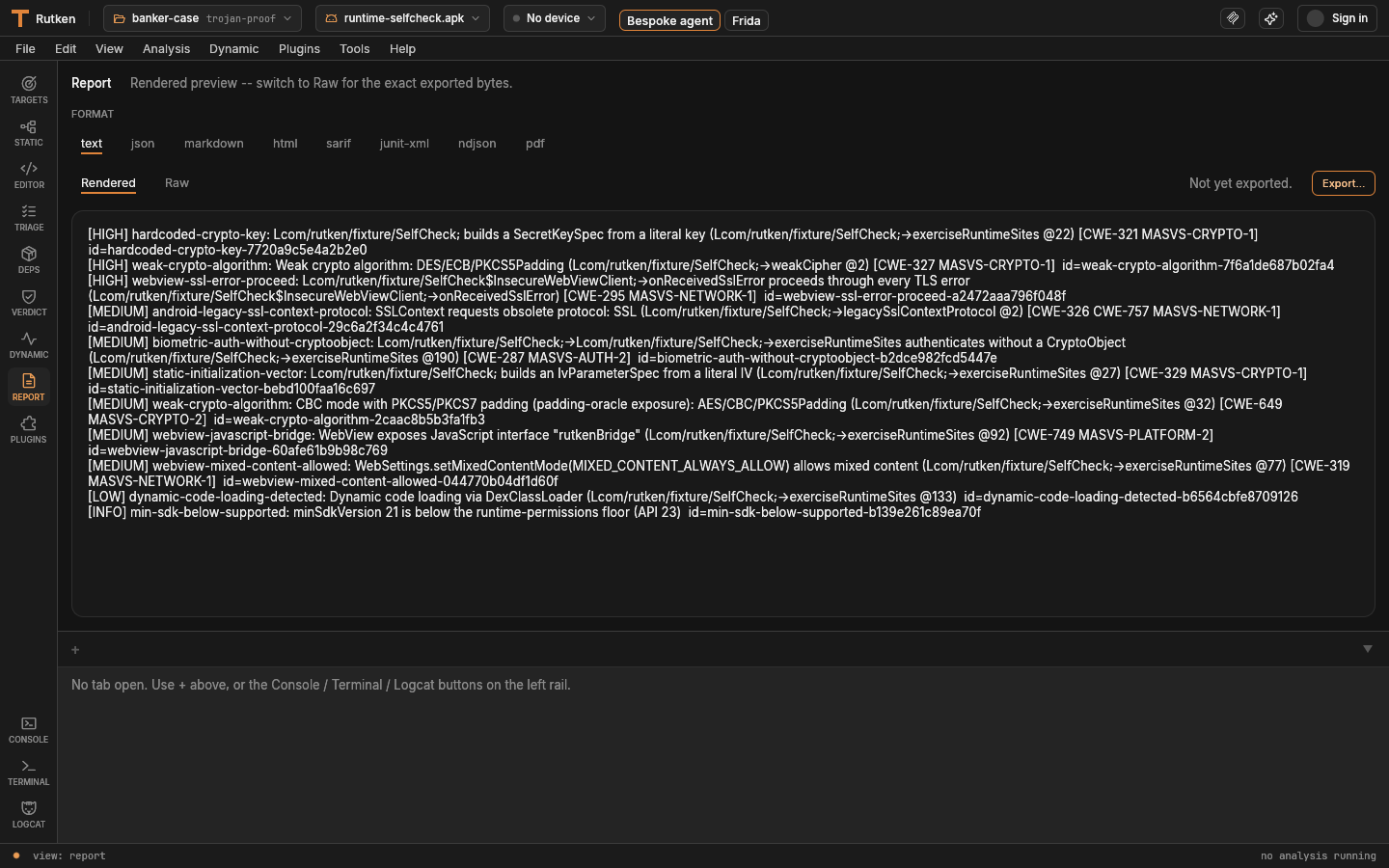
Click REPORT for a shareable write-up, the findings, their evidence, and the APK's metadata, ready to hand to a developer or drop into a ticket. This is the difference between "I reverse engineered the APK" and "here is the exact method, the evidence, and the fix."
What static analysis does not settle
Reverse engineering an APK statically is powerful and it is also bounded, and a tool that pretends otherwise is selling you a false sense of coverage. Three honest limits. First, reflection and dynamically loaded code: an app that resolves a class by string at runtime, or loads a payload it downloads later, has a code path the static graph cannot fully see, which is exactly why droppers do it, and why the runtime pass exists. Second, "can reach" is not "does reach", a reachable sink with an incomplete taint path is a lead to confirm, not a proven exploit, and Rutken labels it that way rather than inflating it. Third, native code: logic that lives in a bundled .so is a different analysis problem than Dalvik bytecode. We would rather hand you a precise picture of what the static pass proved, and point you at runtime for the rest, than a green checkmark you cannot defend in a report.
Reverse engineer your first APK for free
Everything above, decompile, call graph, data-flow, findings, and the report, runs on the free tier with no device needed. Download Rutken, open an APK you own, and read what it actually does.
Frequently asked questions
Is reverse engineering an APK legal? Analyze apps you own, apps you are authorized to test, and apps whose terms permit it. Rutken is built for authorized security testing and research; do not analyze apps you have no right to.
Do I need to root my device? No. The static pass needs no device at all, and Rutken's runtime instrumentation has a no-root path for observing normal apps.
How is this different from jadx or apktool? Those decompile. Rutken decompiles and builds the call graph, runs data-flow analysis, produces ranked findings with evidence, and lets you confirm them at runtime, in one tool.
Can it reverse engineer obfuscated (R8/ProGuard) APKs? Yes. The analysis works on renamed code, and Rutken uses structural matching, identifying a class or method by its descriptor shape and call relationships rather than its stripped name, to recognize common libraries and sinks even when the identifiers are gone.
What file formats does it read? The APK's DEX bytecode, the binary manifest, and resources.arsc. For split APKs, point it at the base APK (the config splits carry no DEX).
Does it decompile to Java source? It gives you a readable intermediate representation and the raw Dalvik disassembly, plus the call graph and data-flow on top. The goal is understanding and evidence, not a perfectly recompilable source tree.
Can it find where user input reaches a dangerous call? Yes, that is what the taint analysis is for: label a source, and it tracks whether the value flows into a sink, reporting a complete path as a proven flow and a gap as a possible one.